
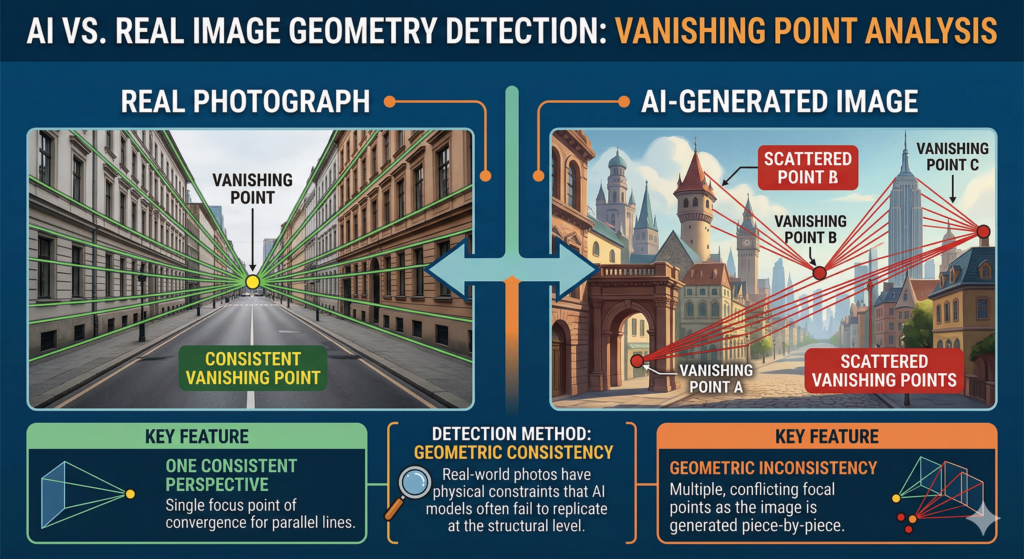
The explosion of AI-generated content presents a major challenge: how do we distinguish the authentic from the synthetic when pixels appear flawless? The answer lies not in surface details, but in the deep mathematical structure of the image—specifically, its projective geometry.
Perspective: The Signature of a Physical Sensor
When a real camera captures a scene, it projects a 3D world onto a 2D plane through a single optical center. This physical constraint imposes a strict geometric rule: all parallel lines in the real world (such as train tracks or the edges of a building) must converge toward a single point on the image, known as the vanishing point.
In an authentic photograph, coherence is absolute. All vanishing lines within the scene point toward a common origin dictated by the camera’s position and lens focal length.
The Failure of Generative Models
AI models do not « perceive » 3D space. Instead, they predict pixel sequences based on statistical probabilities. While they excel at mimicking the appearance of perspective, they often construct images piece by piece without a global geometric engine.
This leads to geometric inconsistency:
Multiple Vanishing Points: An image may exhibit several diverging vanishing points where there should be only one.
Structural Drift: Objects on the same horizontal plane may point toward different horizons.
Lack of Global Constraint: The model might « draw » a window with one perspective and a floor with another, lacking a mathematical link between them.
Detection Methodology
Detection involves extracting dominant line segments using algorithms like the Hough Transform. By extending these segments, we observe their intersection points:
Converging Intersections: If lines meet at a tightly defined zone, the image respects camera physics (High probability of being real).
Scattered Intersections: If intersections are chaotically dispersed, the image is a synthetic construction (AI detected).
Below is an interactive simulation demonstrating this phenomenon:
Here is how to use the simulation tool to test your images:
1. Upload an Image
Click the Choose File button in the 1. Import Image section. Select the image you want to analyze (either a real photograph or an AI-generated one).
2. Trace Structural Lines
Look for straight lines in the scene that would be parallel in real life (building edges, floor tiles, ceilings, or window frames).
Click and hold your mouse at the start of a line.
Drag along the edge of the structure.
Release to set the line.
Trace at least 3 lines to get an accurate result.
3. Observe the Red Points
As you add lines, red dots will appear. These represent the calculated intersections between all your lines.
If the red dots are tightly clustered in one spot (even if that spot is outside the image frame), the perspective is consistent.
If the dots are scattered all over the place, the geometry is inconsistent.
4. Check the Verdict
Look at the Results panel on the left:
REAL (CONVERGENT): The lines meet at a single point. This indicates a real camera perspective.
AI / FAKE (DIVERGENT): The dispersion is too high. The AI likely built the image in pieces without a single mathematical perspective.
5. Reset
If you make a mistake or want to try a new image, click the Clear lines button to start over.
Geometric Perspective Analyzer
Artificial image detection via vanishing point convergence calculation
1. Import Image
2. Instructions
- Trace at least 3 lines following structures (walls, columns).
- Intersection points will appear automatically.
- High dispersion indicates a potentially AI-generated image.